
Joining us after the ALC Industry Partner Showcase? Welcome. This is the practical version of what we covered in the breakout room — where a quality check actually belongs in your workflow, and where it doesn’t.
Where Does AI Translation QA Fit in Your Workflow?
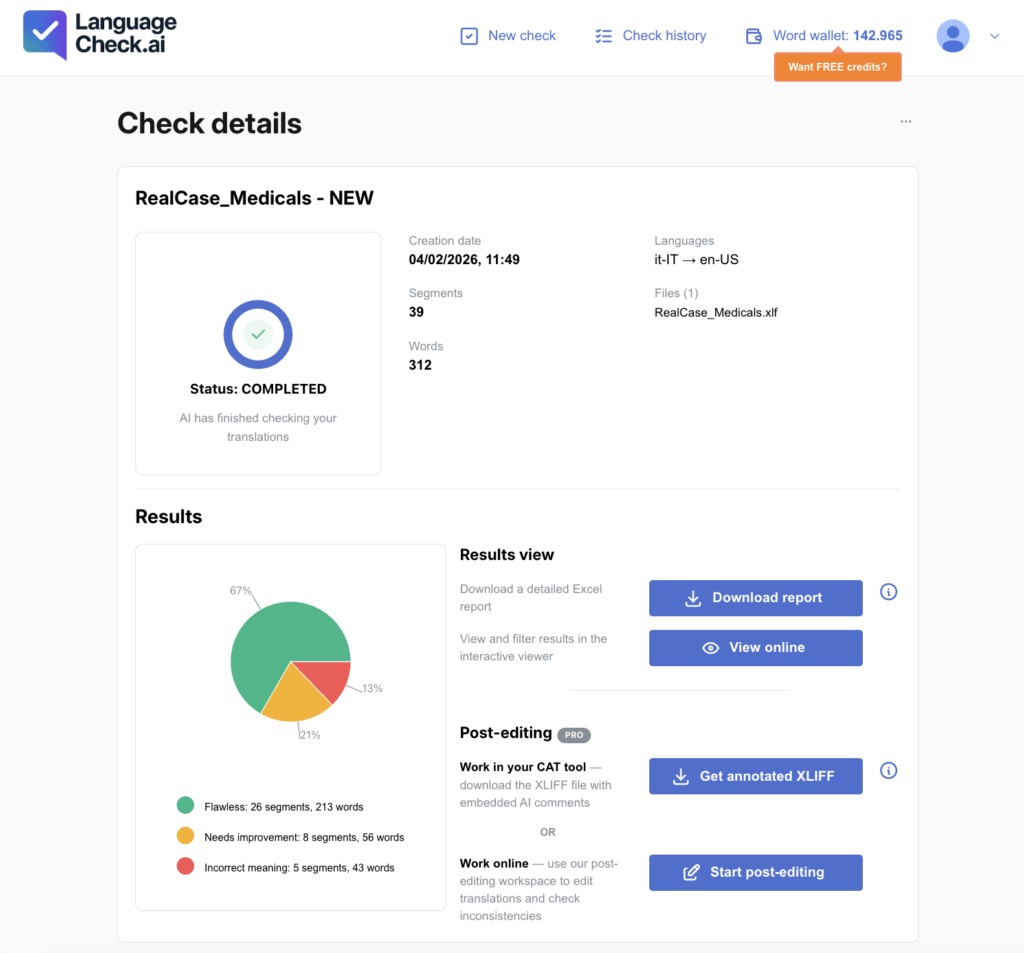
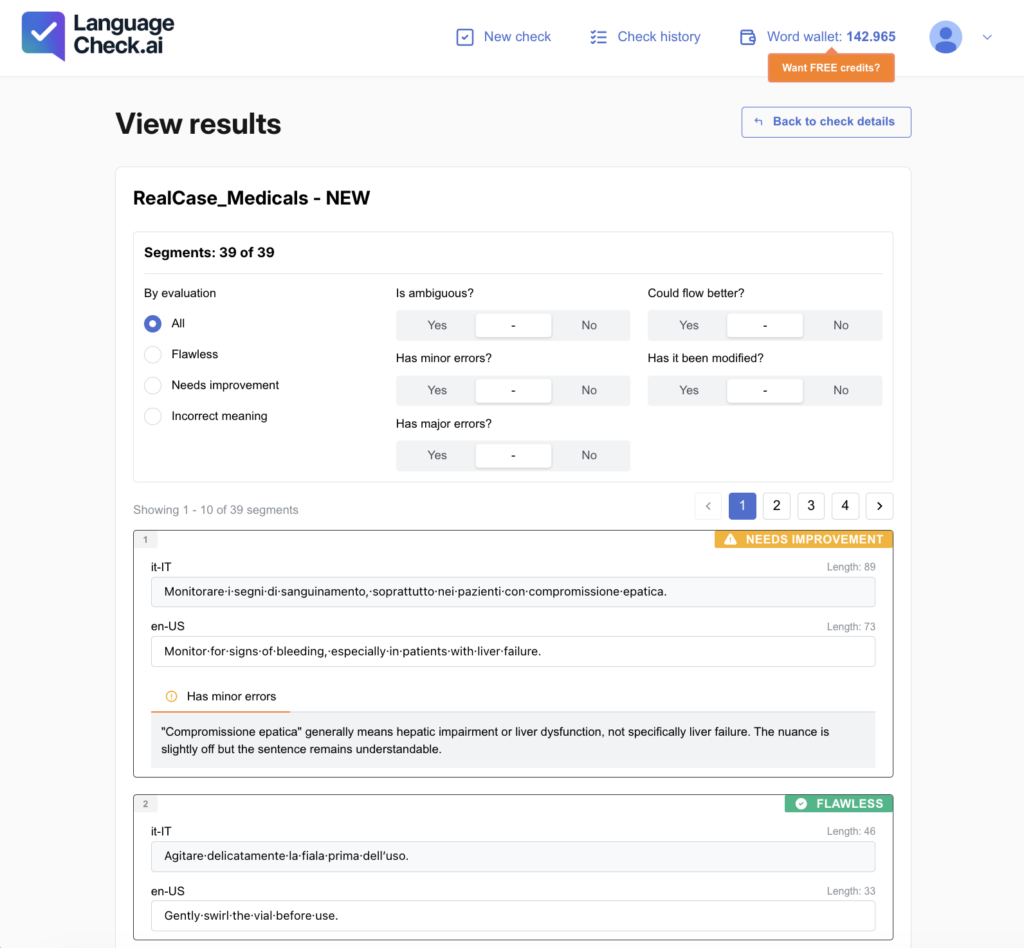
LanguageCheck.ai is an AI-powered quality check for human and machine translations. It analyzes translated files segment by segment, classifies each segment as Flawless, Needs Improvement, or Incorrect Meaning, and explains what it found, so reviewers spend their time only on the segments that need it. On average, that’s less than 30% of a file. It doesn’t translate, it doesn’t change your text, and it doesn’t grade your linguists. It shows you where quality risk lives in a file, at up to 1,000 words per minute, using an error framework informed by MQM and ISO 5060.
That’s the what. The more useful question in 2026, the one language companies are actually asking, is where. An AI quality check dropped randomly into a pipeline produces noise. Placed at the right points, it stops being an experiment and becomes infrastructure: measurable, repeatable, and defensible when a client asks how you verify quality.
Here’s where it earns its place, by role.
Where language companies (LSPs) use LanguageCheck.ai
Language companies get the most value at three points: before post-editing begins, before files go back to the client, and when auditing existing TM content.
- MTPE triage. Run raw machine translation output through a check before assigning post-editing. Segments rated Flawless move fast; effort concentrates on the minority flagged Needs Improvement or Incorrect Meaning. That’s the difference between paying a linguist to re-read everything and paying them to fix what’s actually broken.
- Pre-delivery verification. A final, independent pass on outbound files, human-translated or post-edited, catches meaning shifts, terminology that drifted from the client’s termbase, and mechanical errors before the client finds them. Every flag comes with an explanation, so the fix is fast.
- TM and legacy content audits. Translation memories accumulate errors over years of leverage. Batch-checking existing TM content tells you which of it is safe to keep reusing, and which segments are quietly propagating old mistakes into new projects.
- Running it as a team. With TEAM Enterprise, project managers work from a shared word wallet with role-based permissions, and can invite external post-editors into a controlled post-editing environment with a single link — full oversight of the check, without handing out full platform access.
Where freelance translators use LanguageCheck.ai
For independent linguists, it works as a second pair of eyes before delivery, and as a way to make your quality visible to clients.
- Self-revision. A structured second pass on your own work before you hit send. It catches the things a tired eye skips after six hours in the same file, and because only flagged segments need attention, the pass is fast.
- MTPE assignments. When an agency sends machine output for post-editing, a check shows you where to spend your time instead of reading 100% of the text to fix a fraction of it.
- Proof of quality. Documented, standards-based checking, grounded in MQM and ISO 5060, becomes part of your service offering, not just a personal safeguard. With direct clients increasingly asking for evidence of quality control, “here’s my QA process” is a differentiator, not a formality.
Where localization teams and translation buyers use LanguageCheck.ai
On the buyer side, it works as an independent verification layer on vendor deliveries.
- Spot-checks on inbound work. Quantify the quality of what vendors return without staffing a full second review, and know which projects deserve a closer human look.
- Terminology governance. Verify that approved terminology actually made it into the target text, consistently, across vendors and languages.
- A shared quality language. Because results align with MQM and ISO 5060, buyers and vendors can discuss quality with comparable evidence instead of competing opinions — and the reports are shareable when compliance or stakeholders need documentation.
How it fits alongside your CAT tool
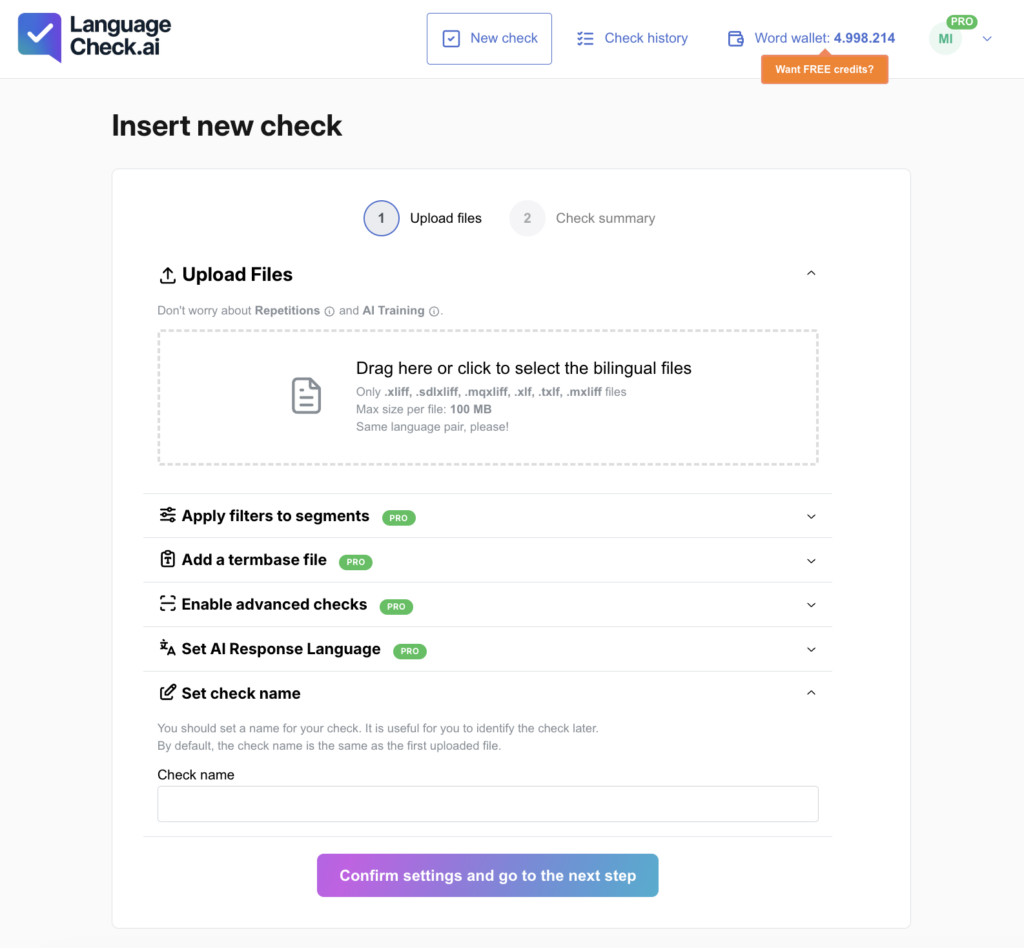
LanguageCheck.ai works with the standard bilingual files your translation tools already produce, including XLIFF, SDLXLIFF, MQXLIFF, XLF, and TXLF, so it can integrate through XLIFF roundtrip with all major CAT workflows, such as Trados Studio, memoQ, Phrase, and many others. You can upload your bilingual file to LanguageCheck.ai, run the quality check, review and correct the flagged segments directly in the online post-editing environment, and then export the corrected file back to your CAT tool. Alternatively, you can export an annotated XLIFF with detailed comments and perform the corrections directly inside your preferred CAT environment.
It complements the rule-based QA built into CAT tools rather than replacing it. Pattern checkers are good at tags, numbers, and punctuation. LanguageCheck.ai evaluates what they can’t: meaning, fluency, and terminology in context.
What LanguageCheck.ai deliberately doesn’t do
Three boundaries, by design:
- It doesn’t translate. It checks translations, human or machine. That’s the whole point.
- It doesn’t change your text automatically. Every flagged segment comes with an explanation and a possible improvement; a human decides what to accept. AI checks, humans decide.
- It doesn’t evaluate people. The checks assess the material, never the professional. It’s a tool for linguists and quality managers, not a scorecard over their heads.
Frequently asked questions
Is LanguageCheck.ai a machine translation tool? No. LanguageCheck.ai does not produce translations. It checks existing human or machine translations segment by segment and reports which segments need attention, with explanations and possible improvements.
What quality standards is LanguageCheck.ai based on? Its error detection and categorization are informed by MQM (Multidimensional Quality Metrics) and ISO 5060, the international standard for translation quality evaluation.
What file formats does LanguageCheck.ai support? XLIFF, SDLXLIFF, MQXLIFF, XLF, and TXLF — the bilingual formats produced by CAT tools such as Trados Studio, memoQ, and Phrase.
How fast is the check, and how much of a file gets flagged? Analysis runs at up to 1,000 words per minute. On average, less than 30% of a file is flagged for attention — the rest is rated Flawless and needs no review time.
Can teams use LanguageCheck.ai together? Yes. TEAM Enterprise adds multi-user access with role-based permissions, a shared word wallet, and the ability to invite external post-editors into a controlled post-editing environment via a link.
See it on your own files
The fastest way to find where LanguageCheck.ai fits your workflow is to run a real file through it. Create a free account at languagecheck.ai, upload a recent project, and look at what comes back.
If you’d rather have a guided walkthrough with your own content and language pairs, get in touch, we’ll map it to your pipeline together.